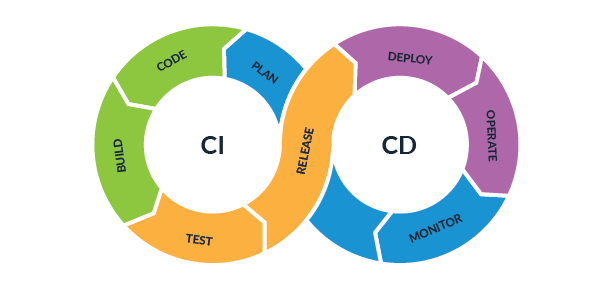
I've lost count of how many times a "quick fix" pushed straight to production has taken down a client's checkout flow at 6pm on a Friday. Every single one of those incidents was preventable, and not with some exotic tooling — just a pipeline that runs the tests before the code ships and automates the deploy so a tired human isn't typing kubectl commands from memory. That's really the whole pitch for CI/CD. It's not glamorous, but it's the difference between "we found the bug in a two-minute build" and "we found the bug in production, from an angry customer."
In this post I'll walk through how I set up CI/CD pipelines with GitHub Actions on real projects — from the basic building blocks through a working example workflow you can adapt, including the parts most tutorials skip: caching, secrets, environment gates, and the mistakes that turn a helpful pipeline into a liability.
What CI/CD actually solves
Continuous Integration means every time someone pushes code, an automated process builds it and runs the test suite. That's it. The value isn't the automation itself — it's that breakage gets caught in minutes, on the commit that caused it, instead of days later when nobody remembers what changed. I've seen teams go from "who broke the build?" archaeology sessions to just glancing at a red X on a pull request and knowing exactly which line to fix.
Continuous Deployment (or delivery, if you keep a manual approval step) takes it further: once code passes CI, it gets packaged and shipped without a person SSHing into a server and running commands by hand. Manual deploys are where typos, skipped steps, and "I forgot to restart the service" incidents live. Automating that step doesn't just save time — it removes an entire category of human error.
The anatomy of a GitHub Actions workflow
If you've never written one, the mental model is simpler than it looks. A workflow is a YAML file in .github/workflows/, and it has four core concepts:
- Triggers (
on:) — what causes the workflow to run. Usuallyon: pushfor commits to a branch, andon: pull_requestso checks run before code merges. You can also trigger on tags, schedules (cron), or manually viaworkflow_dispatch. - Jobs — a workflow is made of one or more jobs, each running on its own fresh virtual machine. Jobs run in parallel by default unless you tell one to
needs another. - Steps — the individual commands inside a job, run in order on the same machine. A step can run a shell command directly or call a reusable "action" (a packaged bit of automation, like
actions/checkoutwhich pulls your repo onto the runner). - Runners — the actual machine executing your job. GitHub gives you free hosted runners (
ubuntu-latest,windows-latest,macos-latest), or you can register your own self-hosted runner if you need specific hardware or network access.
That's the whole vocabulary. Everything else is just steps calling tools you already use locally — npm, pytest, docker, kubectl — inside that structure.
A concrete example workflow
Here's a workflow I've used as a starting template for a Node app that builds a Docker image. It installs dependencies, lints, tests, builds, then builds and pushes an image — only on pushes to main, while pull requests just get the checks without the image push:
name: CI/CD

on:
  push:
    branches: [main]
  pull_request:
    branches: [main]

jobs:
  build-and-test:
    runs-on: ubuntu-latest
    steps:
      - name: Checkout code
        uses: actions/checkout@v4

      - name: Set up Node.js
        uses: actions/setup-node@v4
        with:
          node-version: '20'
          cache: 'npm'

      - name: Install dependencies
        run: npm ci

      - name: Run lint
        run: npm run lint

      - name: Run tests
        run: npm test -- --ci

      - name: Build app
        run: npm run build

  docker-build-push:
    needs: build-and-test
    if: github.ref == 'refs/heads/main'
    runs-on: ubuntu-latest
    steps:
      - name: Checkout code
        uses: actions/checkout@v4

      - name: Log in to GitHub Container Registry
        uses: docker/login-action@v3
        with:
          registry: ghcr.io
          username: ${{ github.actor }}
          password: ${{ secrets.GITHUB_TOKEN }}

      - name: Build and push image
        uses: docker/build-push-action@v5
        with:
          context: .
          push: true
          tags: ghcr.io/${{ github.repository }}:${{ github.sha }}
Notice the second job only runs after build-and-test succeeds, and only on main — a pull request from a feature branch runs the checks but never pushes an image. That separation matters more than it looks; it's what stops half-tested code from ever reaching a registry.
Docker inside the pipeline
The docker/build-push-action step above is doing the heavy lifting: it builds the image from your Dockerfile and pushes it straight to GitHub Container Registry (ghcr.io), tagged with the commit SHA so every image is traceable back to the exact code that produced it. If you'd rather use Docker Hub, swap the registry and login credentials — the shape of the step doesn't change. Tagging by SHA (instead of always overwriting latest) is worth doing from day one; it's the only thing that lets you say "roll back to the image from three commits ago" with any confidence.
Deploying to Kubernetes
Once the image is pushed, the deploy step just needs to tell your cluster to pull the new tag. In practice I add a job like this after the Docker build:
  deploy:
    needs: docker-build-push
    runs-on: ubuntu-latest
    environment: production
    steps:
      - name: Set up kubectl
        uses: azure/setup-kubectl@v4

      - name: Configure cluster access
        run: echo "${{ secrets.KUBE_CONFIG }}" | base64 -d > kubeconfig.yaml

      - name: Roll out new image
        run: |
          kubectl --kubeconfig=kubeconfig.yaml set image \
            deployment/my-app my-app=ghcr.io/${{ github.repository }}:${{ github.sha }} \
            -n production
          kubectl --kubeconfig=kubeconfig.yaml rollout status deployment/my-app -n production
kubectl set image triggers a rolling update, and rollout status makes the job wait and fail loudly if the new pods don't come up healthy — which is exactly the signal you want before anyone declares the deploy done.
Secrets management
Never, ever hardcode credentials in your YAML — not "temporarily," not "just for testing." GitHub Actions has repo-level secrets (Settings → Secrets and variables → Actions) that you reference as ${{ secrets.NAME }} and that never appear in logs. For anything touching production — kubeconfig, cloud API keys, database passwords — use environment secrets instead of repo secrets. Environments let you scope a secret to, say, "production" only, and layer required reviewers on top, so a secret meant for prod literally cannot leak into a workflow run against a feature branch.
Caching and deploy gates
The cache: 'npm' line in the setup-node action above isn't decoration — it caches node_modules between runs, and on a mid-sized project that alone can cut a few minutes off every single build. The same principle applies to Docker layer caching and language-specific dependency caches (pip, Maven, Go modules); if your pipeline is slow, caching is almost always the first place to look before you start splitting jobs.
The other lever is environments with required reviewers. Setting environment: production on a job (as I did in the deploy job above) lets you require one or more people to click "approve" before that job runs, even though everything upstream ran automatically. This gives you full CI/CD speed for everything up to the point of actually touching prod, with a human checkpoint exactly where you want one.
Where pipelines go wrong
The failure mode I see most often isn't a missing feature — it's over-engineering. Teams add fifteen conditional steps, six reusable workflows, and a dozen environment-specific branches until nobody on the team can explain what happens when they push code. When that pipeline breaks — and it will — debugging it costs more time than it ever saved. Keep jobs linear and readable; if you need a comment explaining what a step does, that's a sign to simplify it, not document it.
Second: have a rollback plan before you need one. Tagging images by commit SHA (as above) means rolling back is just re-running the deploy step with the previous tag — figure that out during a calm afternoon, not during an incident.
Third, and the one that bites teams a year in: CI/CD is not "set and forget." Dependency versions in your actions go stale, runners get deprecated, your test suite grows slower as the app grows, and a pipeline nobody has touched since launch quietly becomes the thing everyone routes around. Treat the workflow file with the same maintenance discipline as the application code it's shipping — because at that point, it effectively is application code.
If you're setting this up for the first time, don't try to build the full version I've shown here in one sitting. Get lint and test running on pull requests first — that alone will save you from most embarrassing bugs. Add the Docker build once that's solid, then the deploy step, then the approval gate. Each piece earns its place by catching a real problem, and that's a much sturdier pipeline than one written all at once from a checklist.
Tagged under
Related Articles
Building Scalable Microservices with Laravel and Docker
Learn how to create scalable microservices architecture using Laravel and Docker container...
PHP2Shell Explained Simply: CVE-2026-109618 and CVE-2026-109619 (Patch PHP Now)
Two critical PHP flaws, nicknamed PHP2Shell, can let strangers run commands on your server...